
How-to · 5 min read
Exodus Wallet to Bank Account in India: Send USDT, Get INR
Exodus can't pay INR to an Indian bank, but it sends USDT on TRC20. How to move money from Exodus to your bank account: TRX for fees, steps and mistakes.
By Bryan Aaron · Updated
Quick answer
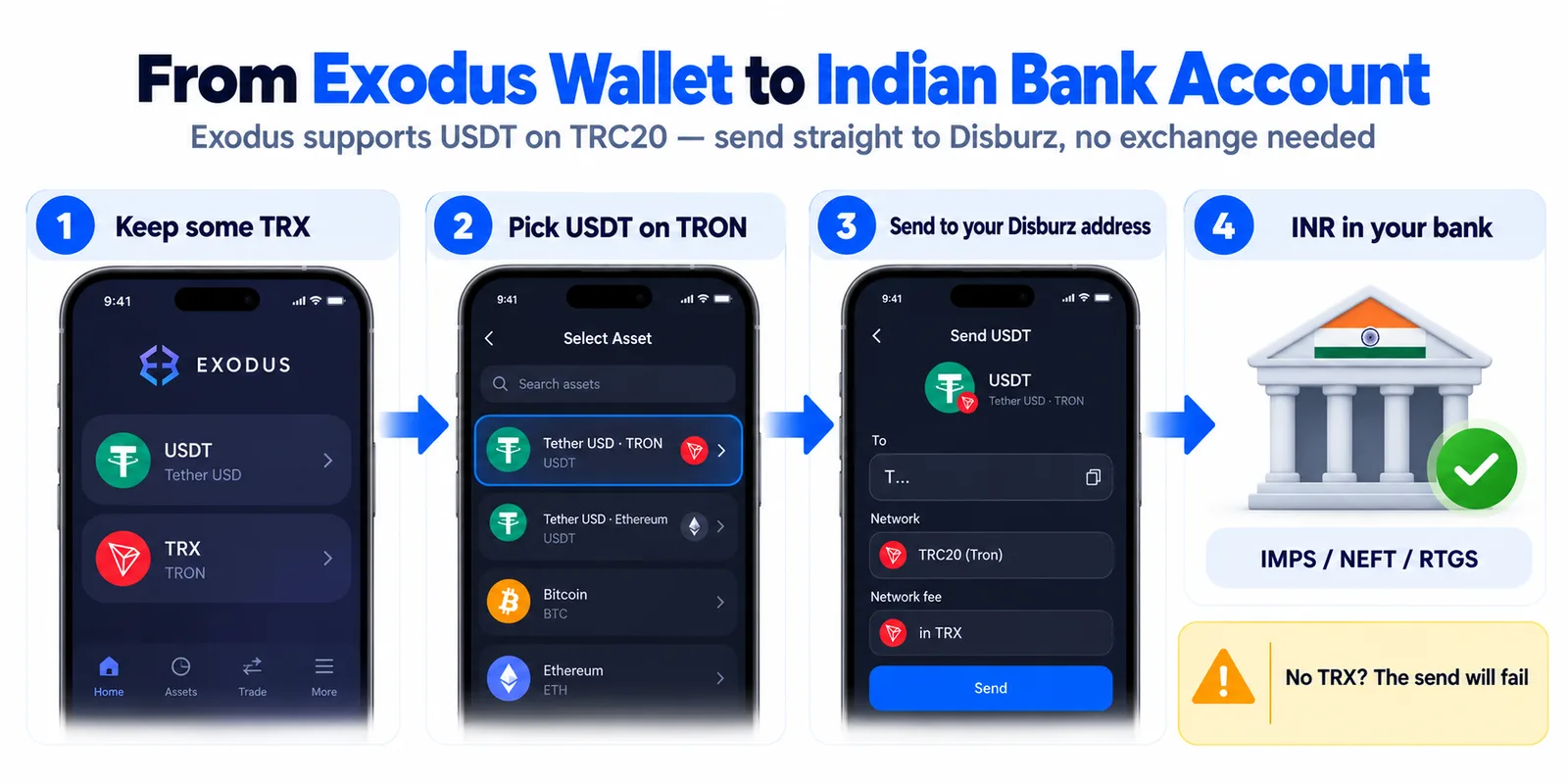
Exodus can't pay rupees into an Indian bank account; its in-app Sell pays Indians only to a Visa debit card in USD, EUR or GBP. Exodus does support USDT on TRC20, so keep some TRX for fees, send the USDT on TRON to a direct offramp like Disburz, and receive INR in your bank by IMPS with a UTR. No exchange is needed.
Exodus is a self-custody wallet, so it can't pay rupees into your bank. Its built-in Sell button doesn't help much in India either. The good news is that Exodus supports USDT on TRC20, the network Indian offramps use, so you can send straight from Exodus and skip the exchange that most other wallets need.
What does Exodus's own Sell button do in India?
Exodus sells through MoonPay. Exodus's help centre lists India for Visa debit card payouts only, with the sale in USD, EUR or GBP. Bank-account payouts are for the US, and for the UK and parts of Europe only if you bought with that same bank account before. So for rupees in an Indian bank account, you need another route.
| Exodus Sell (MoonPay) | Send USDT on TRC20 to Disburz | |
|---|---|---|
| Paid to | A Visa debit card that accepts card payouts | Your Indian bank account |
| Currency | USD, EUR or GBP | INR |
| Time | Up to 2 business days to a card | IMPS usually within minutes after confirmation |
| Proof | MoonPay order email | Bank UTR on every payout |
From Exodus Help, checked 26 October 2026. Your card issuer can still block card payouts.
Step 1: Keep TRX for the network fee
This is where most Exodus users get stuck. Sending a TRC20 token uses two TRON resources, bandwidth and energy. If your wallet doesn't have enough of them, Exodus pays the difference in TRX. With no TRX at all, the send won't go through, and TRC20 tokens won't even appear in Exodus's Buy & Sell screen.
- Buy or receive a little TRX into the same Exodus wallet as your USDT.
- On the send screen, Exodus shows a max network fee in TRX. You're only charged what the transaction needs, but keep at least that much.
- Sending to an address that has never held USDT can cost more, because the address has to be set up for the token.
- Selling regularly? Exodus lets you freeze TRX for energy so sends can cost 0 TRX. Unfreezing takes 14 days, so only freeze what you won't need soon.
Step 2: Make sure it's USDT on TRON
Exodus shows the network under each token. You want Tether USD on TRON (TRC20). If your USDT is on Ethereum or BNB Smart Chain, or you hold BTC or ETH, convert it first: use Exodus's Swap if it offers the pair you need, or send it to an exchange on the same network and withdraw USDT on TRC20. Not sure which network an address is on? Paste it into the address checker.
Step 3: Get a Disburz quote and deposit address
On Disburz, enter how much USDT you're selling, add the bank account that should receive the money, and confirm. You get a payment page with a deposit address that starts with T, a QR code and the exact USDT amount. Today's fees are ₹50 fee + 3 USDT network deduction, and the quote shows the exact INR before you send.
Step 4: Send from Exodus
- Open your Tether USD (TRON) wallet in Exodus and tap Send.
- Paste the Disburz deposit address, or scan the QR code. Check the first and last four characters.
- Enter the exact USDT amount from the payment page.
- Check the network fee in TRX, then confirm.
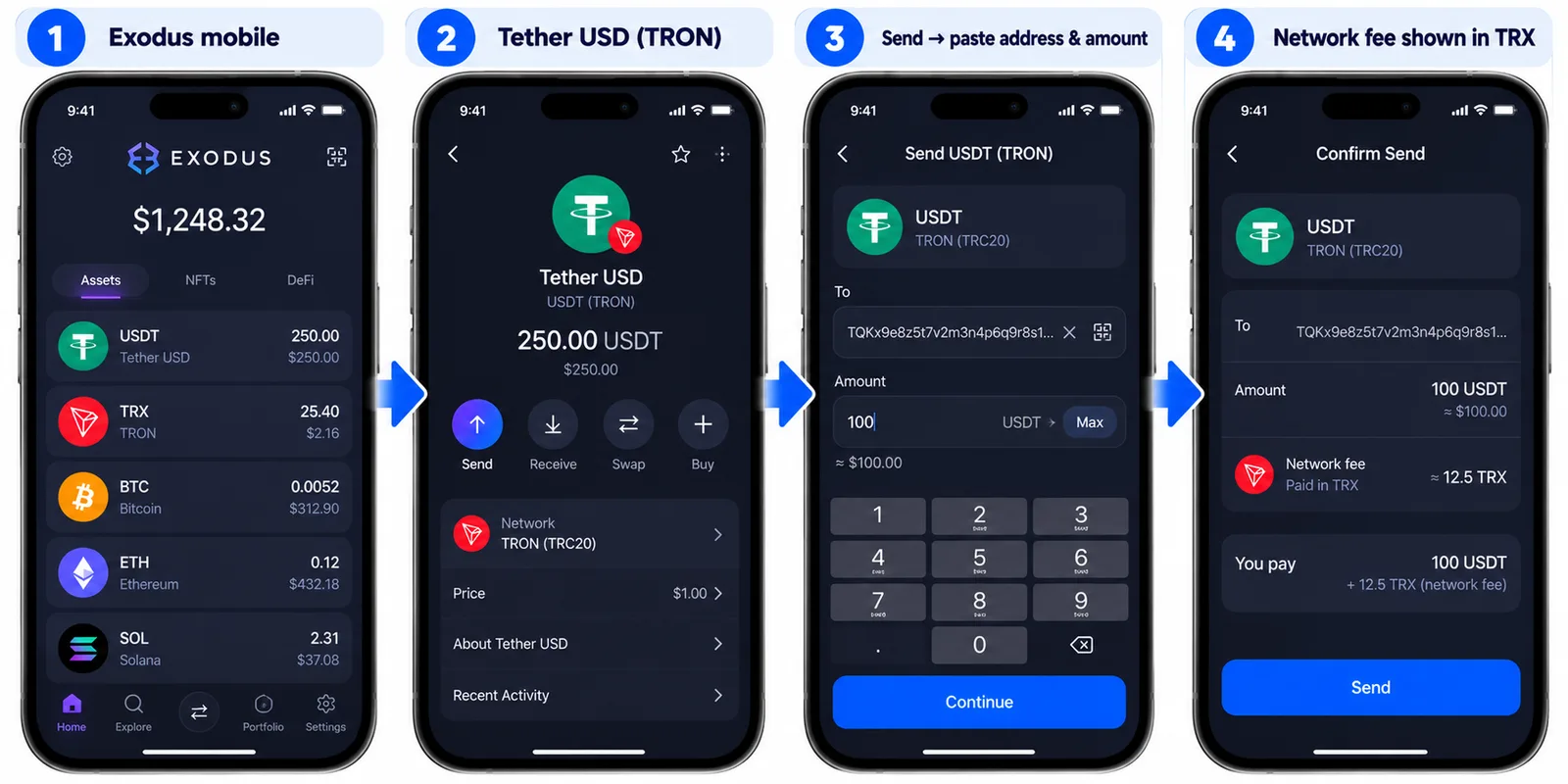
The order page shows when your payment is detected and counts the confirmations, which takes about a minute on TRON. Then INR goes to your bank by IMPS, NEFT or RTGS, and you get an email with the bank UTR. If you sent a slightly different amount, the INR is worked out on what arrived.
Here's what 1,000 USDT arriving on TRC20 pays at today's quote:
| Arrives at Disburz | 1,000 USDT (TRC20) |
| Network deduction | − 3 USDT |
| Rate | 1 USDT = ₹96.00 |
| Converted value | ₹95,712.00 |
| Fee | − ₹50.00 |
| Paid to your bank | ₹95,662.00 |
|---|
Mistakes to avoid
- Sending USDT from the wrong network wallet. Exodus keeps USDT on each network as a separate wallet. Sending ERC20 USDT to a TRON address can't work. See sent crypto on the wrong network.
- Using a Trezor. Exodus says TRON and TRC20 aren't supported with Trezor in Exodus. Ledger in Exodus Mobile does support them.
- Copying an address from your history. Scammers send tiny amounts from look-alike addresses so you copy the wrong one later. Always copy from the Disburz payment page. More in USDT scams in India.
- Importing a recovery phrase someone sent you. Exodus warns about “honeypot” wallets that appear to hold USDT you can't move. Never import keys from strangers.
Tax when you sell
Selling crypto for INR is taxed in India at a flat 30% on gains plus cess, and 1% TDS can apply. See crypto tax and TDS in India.
Other wallets: Trust Wallet, TronLink, MetaMask, Coinbase Wallet, Ledger.