
How-to · 5 min read
KuCoin to Indian Bank Account: Withdraw USDT and Get INR (2026)
KuCoin doesn't pay INR to Indian bank accounts. How to withdraw USDT from KuCoin on TRC20 and get rupees in your bank without P2P, with fees and pitfalls.
By Bryan Aaron · Updated
Quick answer
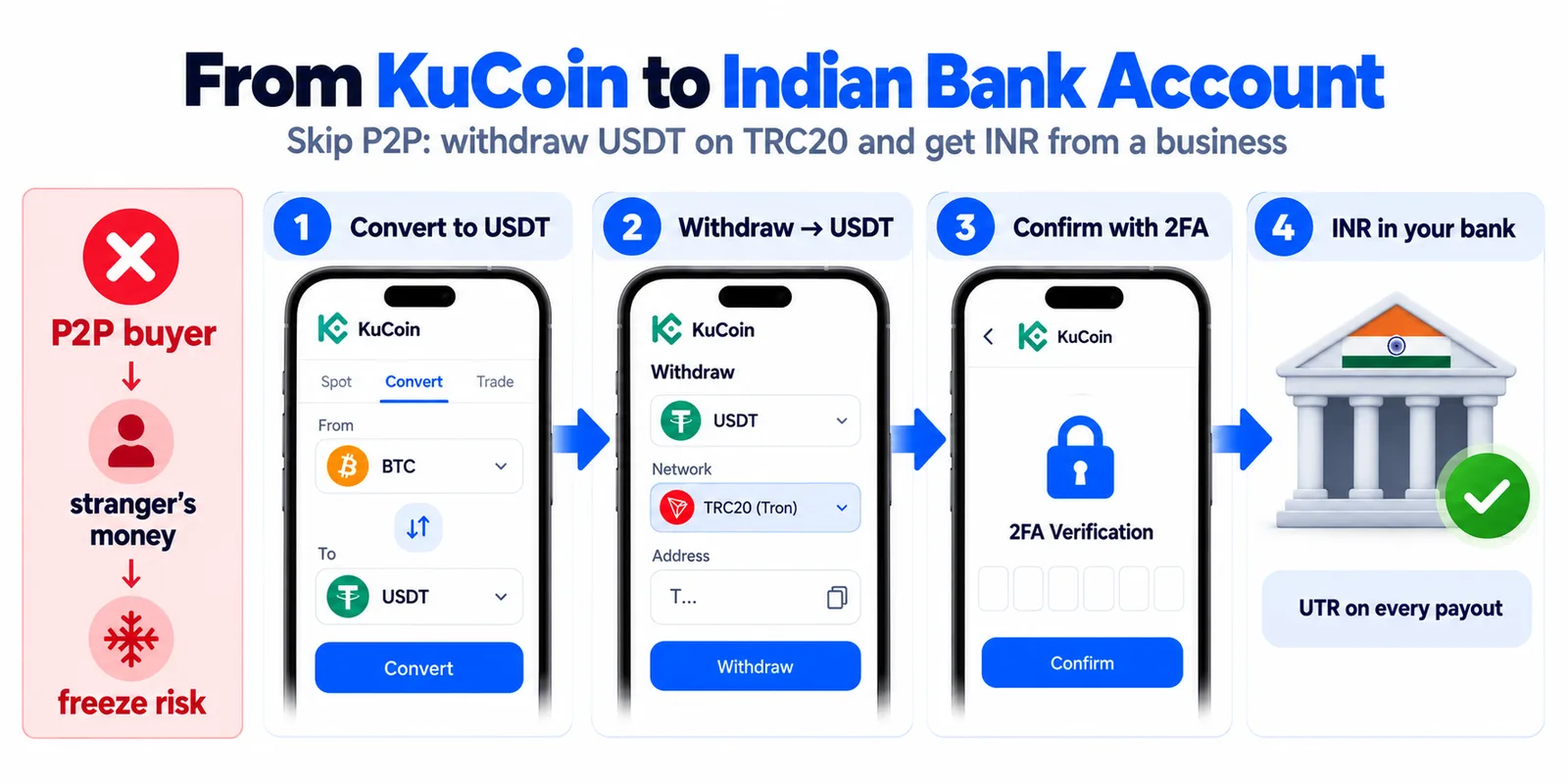
KuCoin doesn't pay INR into Indian bank accounts; its INR sell options are P2P buyers and third-party providers. To get rupees without P2P, convert to USDT, withdraw it on TRC20 to a direct offramp like Disburz (paste the T address and KuCoin picks the network), and receive INR in your bank by IMPS with a UTR.
KuCoin can't send rupees to your bank account. When you look for an INR option inside the app, you land on P2P buyers or third-party providers. There's a cleaner way out: withdraw USDT on the TRON network to a business that pays INR from its own bank account.
Is KuCoin allowed in India?
KuCoin registered with India's Financial Intelligence Unit (FIU-IND) as a reporting entity in March 2024, after FIU-IND acted against offshore exchanges that weren't registered. Registration is an anti-money-laundering requirement, not a licence or a guarantee. Indian tax rules apply as usual: 30% on gains plus cess, and 1% TDS.
Your options for turning KuCoin USDT into INR
| Route | Who pays your INR | Main risk |
|---|---|---|
| KuCoin P2P | A stranger, by UPI or bank transfer | Money linked to fraud can freeze your bank account |
| Third-party providers in KuCoin's Buy Crypto menu | The provider | Availability for INR payouts varies; check fees and payout method first |
| Withdraw USDT on TRC20 to Disburz | Disburz's payout partner, by IMPS, NEFT or RTGS | Sending on the wrong network (avoidable, see below) |
Why P2P is risky is explained in bank account frozen after crypto P2P.
Before you withdraw: two KuCoin settings
- Security: KuCoin needs a trading password plus either your phone number or Google 2FA before it allows withdrawals. Set these up under account security first.
- Account: you can withdraw from the Funding or Trading account directly. On the withdrawal screen, tap the available balance to pick which one.
Step by step: KuCoin to your bank account
- Convert to USDT on KuCoin if you hold another coin.
- Get a Disburz quote for the amount, add your bank account, and confirm. Copy the deposit address (it starts with
T) and note the exact USDT amount. - In the KuCoin app, go to Assets → Overview → Withdraw → Withdrawal Crypto and choose USDT.
- Paste the address. KuCoin detects the network from the address, so it should select TRC20. Check it before going on.
- Enter the amount. KuCoin shows the network fee and the amount that will arrive. Make the amount that arrives match your Disburz order.
- Confirm with your trading password and 2FA.
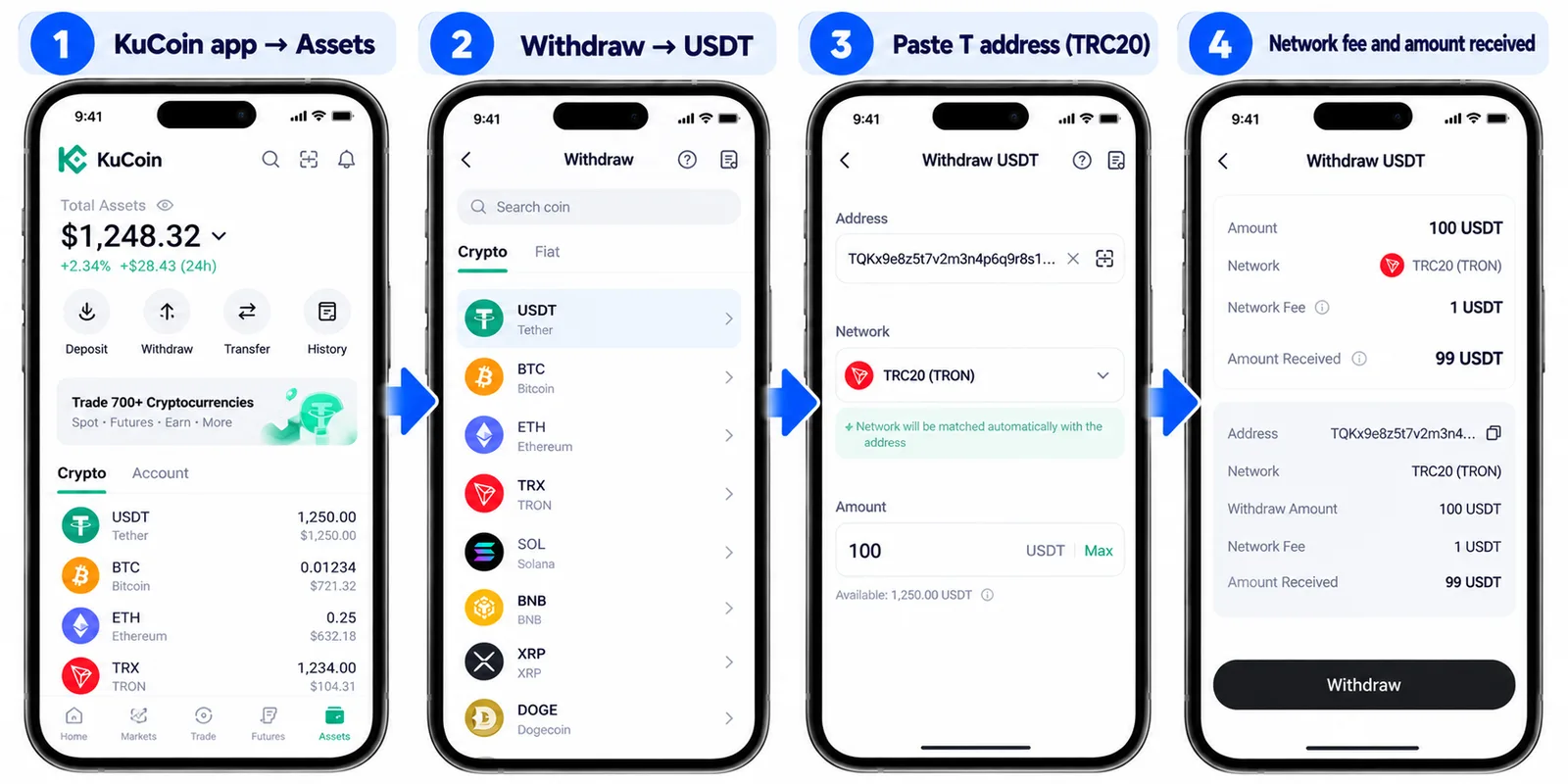
KuCoin says it processes withdrawals within 30 minutes, with larger amounts sometimes reviewed by hand. Once the transfer reaches TRON, Disburz detects it, counts the confirmations (about a minute) and pays INR to your bank with a UTR by email.
What 1,000 USDT arriving on TRC20 pays at today's quote (fees: ₹50 fee + 3 USDT network deduction):
| Arrives at Disburz | 1,000 USDT (TRC20) |
| Network deduction | − 3 USDT |
| Rate | 1 USDT = ₹96.00 |
| Converted value | ₹95,712.00 |
| Fee | − ₹50.00 |
| Paid to your bank | ₹95,662.00 |
|---|
Mistakes to avoid
- Tapping “Internal”. KuCoin's Internal option sends to another KuCoin user with no on-chain transaction. For Disburz you need an on-chain withdrawal.
- Choosing BEP20 or ERC20 for a T address. The network must match the address. Not sure? Use the address checker.
- Splitting a big sale into many small P2P trades. It doesn't make P2P safer; each trade is a new stranger. Selling a lot? Read how to sell a large amount of USDT.
Other exchanges: OKX, Bybit, Binance, Bitget, MEXC and Gate.