
How-to · 8 min read
How to Withdraw from Binance to an Indian Bank Account (2026)
How to withdraw money from Binance in India: the 3 ways to turn USDT into INR in your bank (P2P, an Indian exchange, a direct offramp), costs and steps.
By Bryan Aaron · Updated
Quick answer
Binance doesn't pay INR into Indian bank accounts. To withdraw, either sell on Binance P2P, or send your USDT (usually on TRC20 or BEP20) to an Indian exchange or a direct offramp that pays rupees to your bank. The offramp route avoids P2P buyers and the bank-freeze risk that comes with them.
You can’t withdraw rupees from Binance straight to an Indian bank account. Binance doesn’t offer INR bank withdrawals for Indian users. To get your money out, you either sell on Binance P2P, or withdraw your crypto (almost always USDT) to a platform that pays INR: an Indian exchange or a direct offramp. Here’s how each works, what it costs, and the step-by-step for the route most people end up preferring.
Watch it done: a real Binance to bank sale
Prefer video? This walkthrough (in Hinglish) withdraws USDT from Binance on TRC20 and shows ₹622 landing in the bank 18 minutes later, including the Binance fee mistake to avoid.
Before you start: turn everything into USDT
If you hold BTC, ETH, SOL or other coins on Binance, sell them for USDT first using Spot or Convert. USDT is the cheapest and most widely accepted coin to move out of Binance. Disburz also accepts BTC, ETH, SOL and BNB directly if you’d rather send those.
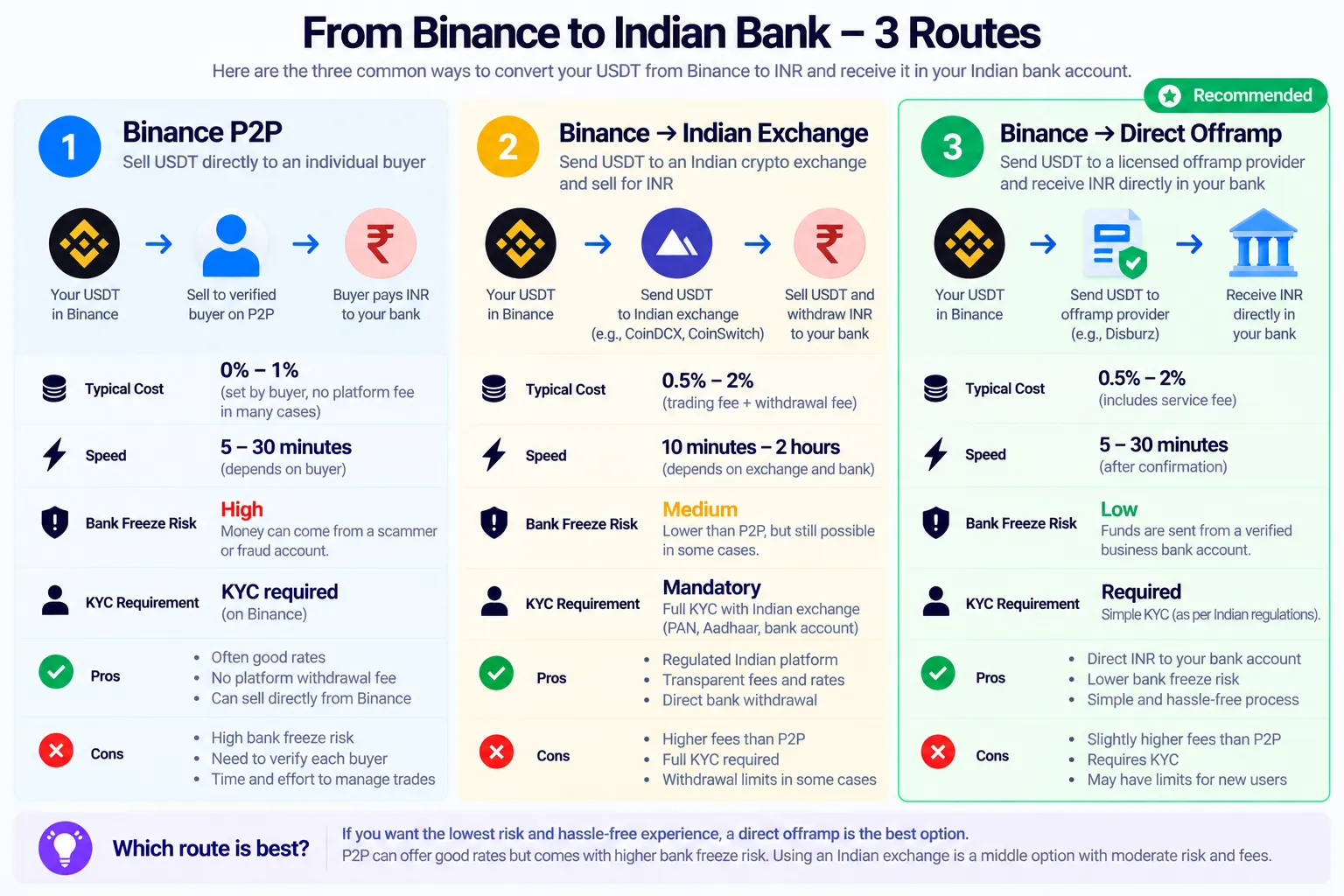
The 3 routes at a glance
| Binance P2P | Indian exchange | Direct offramp (Disburz) | |
|---|---|---|---|
| Who pays you INR | An unknown buyer | The exchange | Disburz |
| Binance fee | None on P2P | Network fee to withdraw | Network fee to withdraw |
| Other costs | Price set by buyer | Spread + trading fee + INR withdrawal fee | 0.3% fee, shown upfront |
| Third-party money risk | Yes | No | No |
| Steps after Binance | None | Sell, then withdraw INR | None, INR goes to your bank |
On another exchange? See Bybit or OKX, KuCoin, Bitget, MEXC and others.
Route 1: Binance P2P
In the Binance app, open P2P, choose Sell and USDT, pick a buyer, share your UPI or bank details, wait for the payment and release the USDT. It’s quick when it works, and Binance doesn’t charge a P2P fee.
The risk is the rupees. They come from a stranger, and if that money is linked to a fraud complaint your account can be frozen weeks later. If that’s already happened to you, read what to do when your bank account is frozen after P2P.
Route 2: Withdraw USDT to a direct offramp (step by step)
This is the cleanest route if you just want rupees in your bank. You withdraw USDT from Binance to a deposit address, and Disburz pays INR to your bank account.
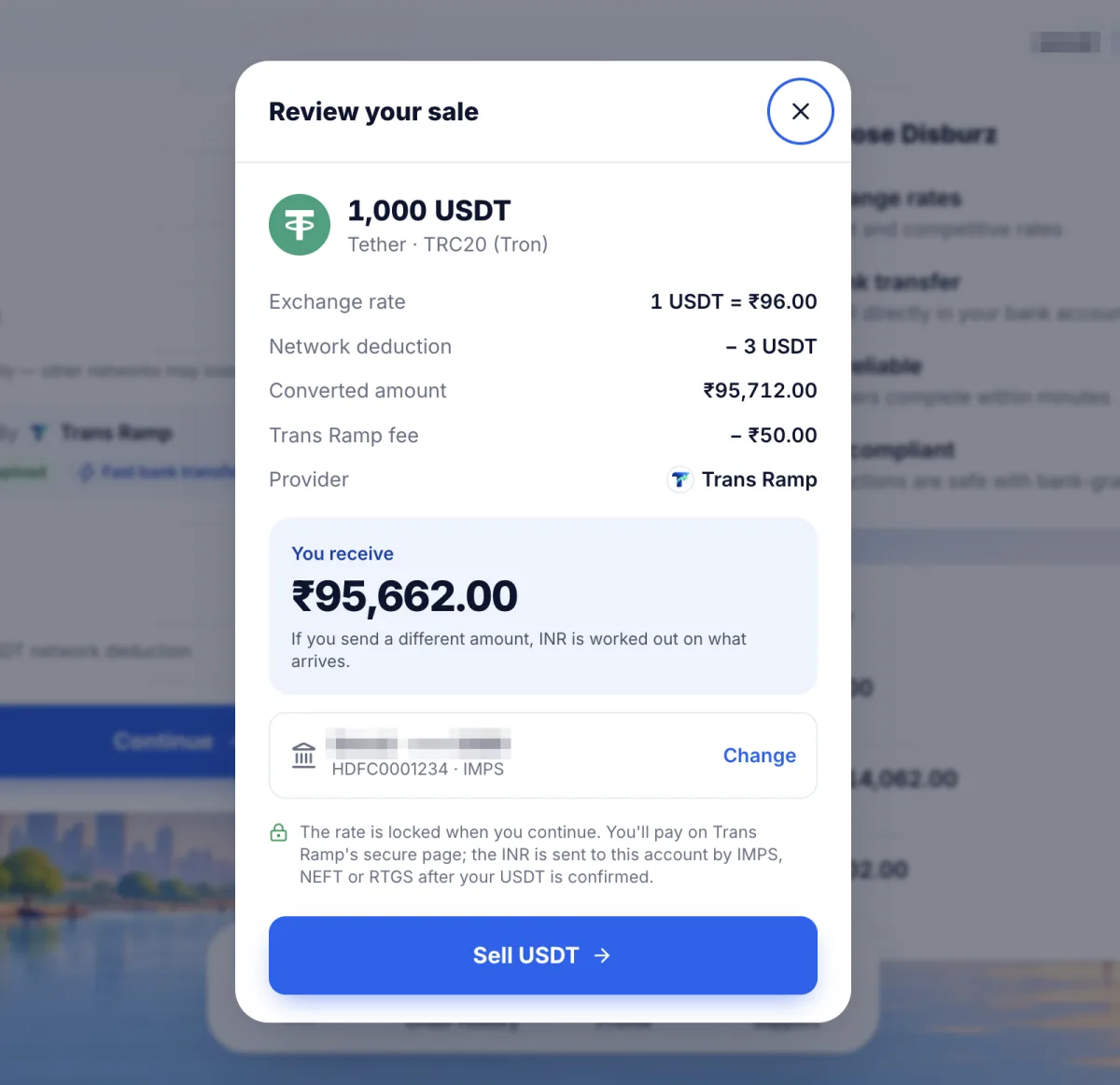
Step 1: Get a quote and pick the network
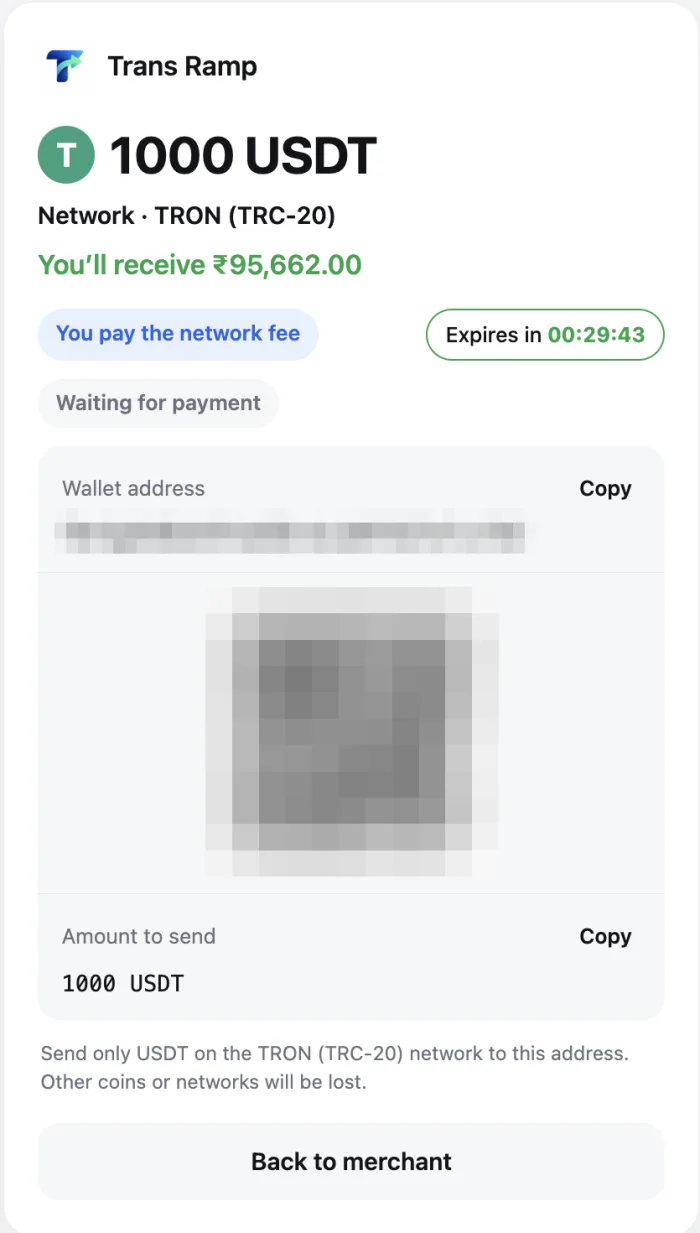
Open the Disburz quote, enter your USDT amount and choose a network Binance also offers. TRC20 is usually the cheapest from Binance. The quote shows the rate, every deduction and the exact rupees you’ll receive. Continue, add your bank account, and you’ll get a deposit address.
Step 2: Open the withdrawal screen on Binance
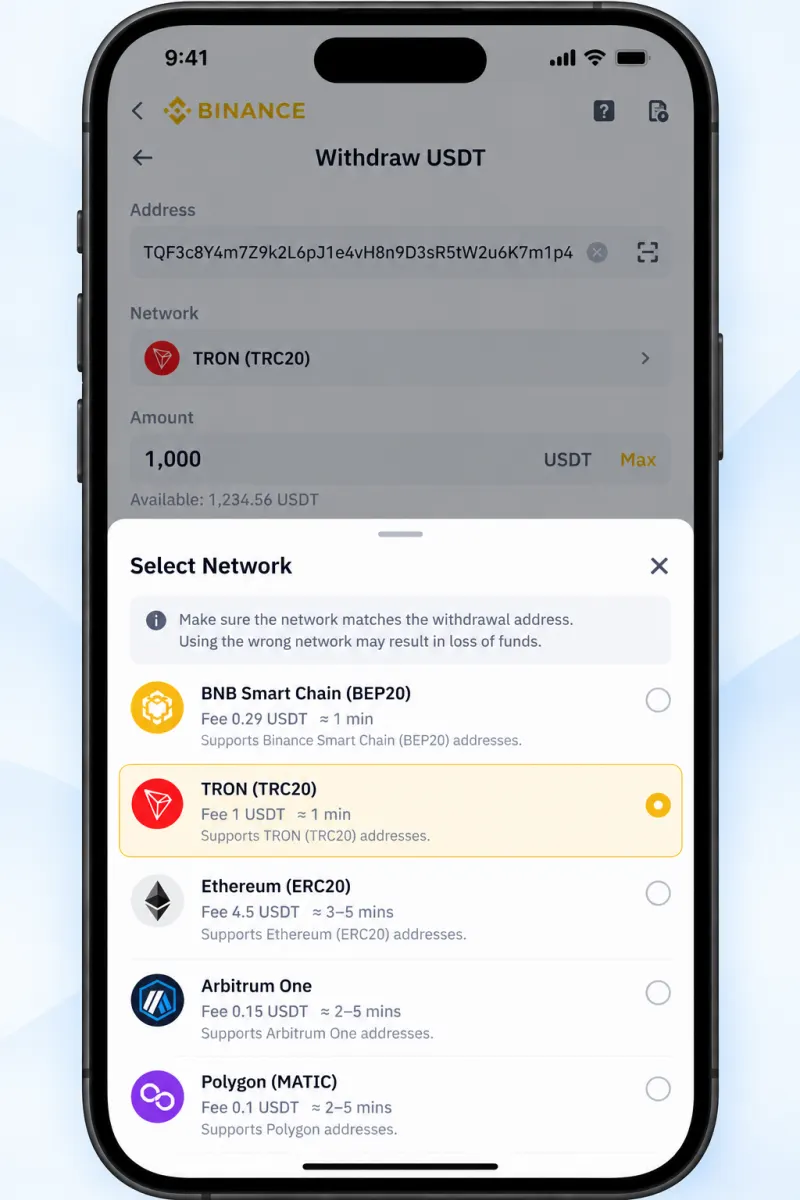
In the Binance app go to Assets, tap USDT, then Withdraw and Send via Crypto Network. (Menu names change from time to time, but “Withdraw” is always under your USDT balance.)
Step 3: Paste the address and choose the same network
Paste the Disburz deposit address. Then select the network, and make sure it’s the exact one in your quote. A TRC20 address starts with T. A BEP20 address starts with 0x, which looks identical to an ERC20 or Polygon address, so the network selector is what counts here. Check the first and last few characters of the pasted address.
Step 4: Enter the amount so the right number arrives
Binance takes its network fee out of the amount you enter. Look at the Receive amount line: that’s what arrives. It needs to match your order. For a 1,000 USDT order on TRC20, with a withdrawal fee of about 1 USDT, you’d enter roughly 1,001.
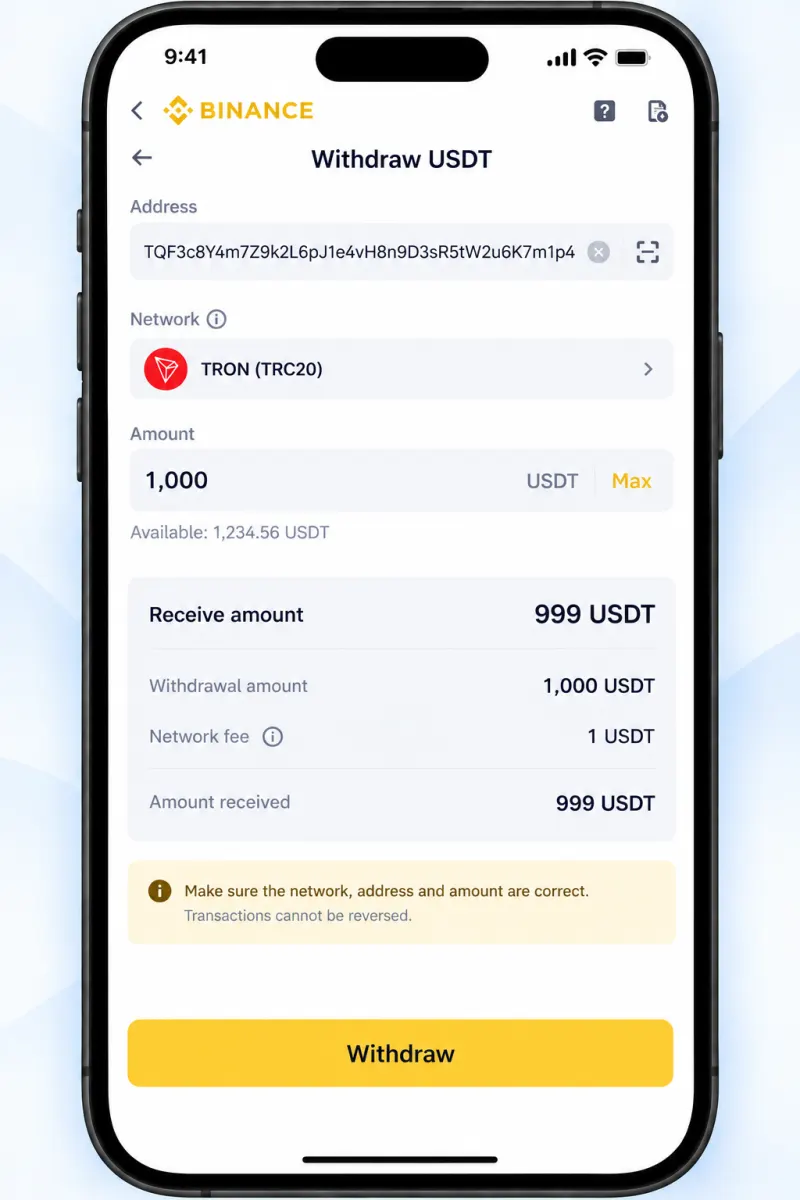
Step 5: Confirm and verify
Tap Withdraw and complete Binance’s security checks (passkey, authenticator or email code). If Binance asks for information about who owns the destination address, contact Disburz support and we’ll tell you what to enter.
Step 6: Track it to your bank
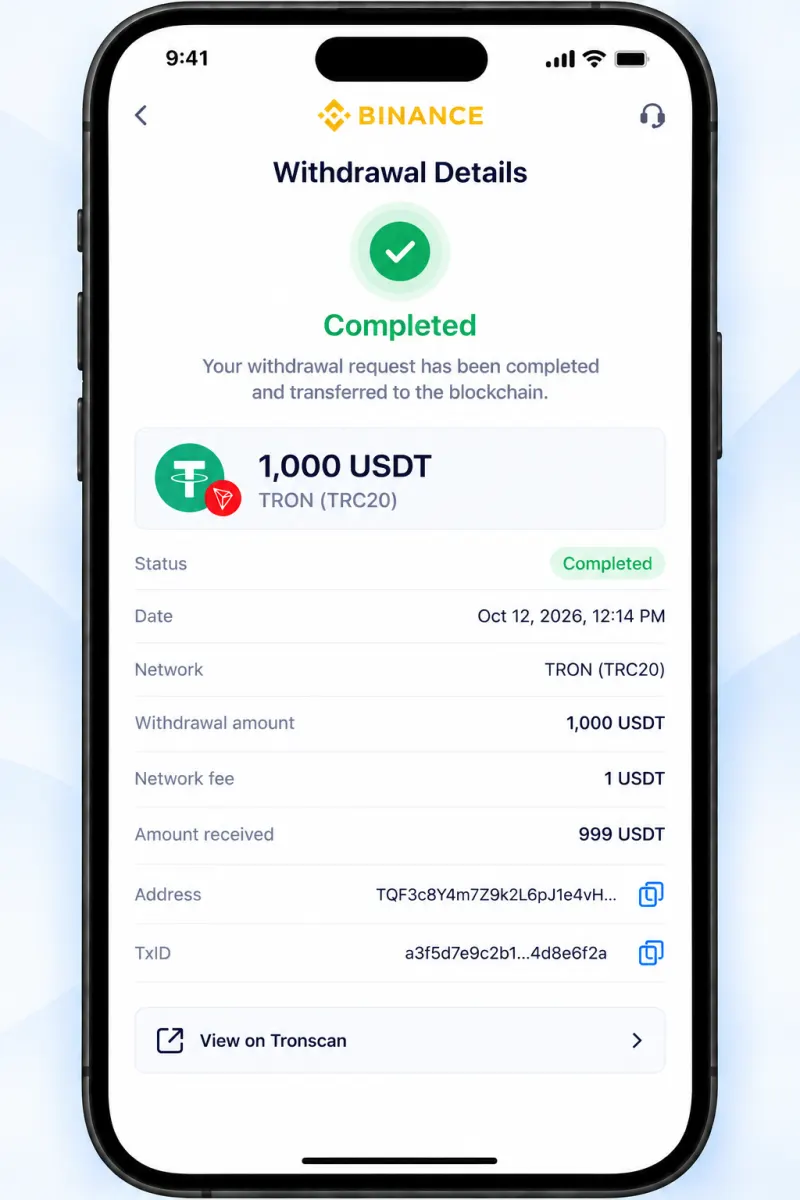
Binance usually processes withdrawals within minutes, then the network confirms the transfer, about a minute on TRC20 or BEP20. Your Disburz order moves from Crypto Received to Bank Settled, and you get the bank UTR. See how long settlement takes for the details.
Route 3: Withdraw to an Indian exchange, then sell
Same withdrawal steps, but to your deposit address on an FIU-registered Indian exchange. Once it arrives, sell USDT on the INR market and withdraw rupees to your bank. It makes sense if you already have a verified account there. You’ll pay the trading spread and fee, and some exchanges charge a flat INR withdrawal fee or limit how much you can take out per day.
Which network to use when withdrawing from Binance
| Network | Binance withdrawal fee (approx.) | Address starts with | Notes |
|---|---|---|---|
| TRC20 (Tron) | About 1 USDT | T | Popular, fast, hard to mix up |
| BEP20 (BNB Smart Chain) | Under 1 USDT | 0x | Cheapest; double-check network |
| Solana | Low | No prefix (base58) | Very fast |
| Polygon | Low | 0x | Double-check network |
| ERC20 (Ethereum) | Several USDT, varies | 0x | Only if you have a reason |
Fees checked October 2026 and change with network conditions. Binance shows the live fee before you confirm. Disburz accepts USDT on all of these networks plus Base.
Worked example
You want to cash out 1,000 USDT from Binance. You get a TRC20 quote, enter 1,001 USDT on Binance so 1,000 arrives after the 1 USDT withdrawal fee, and send it.
| Arrives at Disburz | 1,000 USDT (TRC20) |
| Network deduction | − 3 USDT |
| Rate | 1 USDT = ₹96.00 |
| Converted value | ₹95,712.00 |
| Fee | − ₹50.00 |
| Paid to your bank | ₹95,662.00 |
|---|
Today's live numbers; they update with the quote.
Mistakes we see most often
- Choosing BEP20 in Binance when the quote said ERC20 (or the other way round). Both use
0xaddresses. - Entering the order amount instead of order amount + fee, so slightly less arrives than expected.
- Sending after the rate lock expired. The order is simply re-quoted at the live rate.
- Adding a bank account that isn’t in your own name.
If something has already gone wrong, read sent crypto on the wrong network and contact support with your transaction hash.
Tax
Binance is registered with FIU-IND, and the usual Indian rules apply: 30% tax on gains plus cess, and 1% TDS may be deducted on the sale. Keep your Binance trade history and your Disburz statement (rate, fee, INR paid and UTR for every order). More in our crypto tax and TDS guide.